> ## Documentation Index
> Fetch the complete documentation index at: https://docs.bleed.bot/llms.txt
> Use this file to discover all available pages before exploring further.
# Bump Reminder
> Receive reminders to bump your server on DISBOARD.
## Why use bump reminders?
Receiving reminders to bump your server on **DISBOARD** can help you increase your server's visibility and attract new members.
You can set up the **DISBOARD** bot by clicking [here](https://discord.com/oauth2/authorize?scope=identify+guilds+guilds.join\&response_type=code\&approval_prompt=auto\&client_id=302050872383242240\&redirect_uri=https%3A%2F%2Fdisboard.org%2Fsite%2Foauth-callback).
## Setting up bump reminders
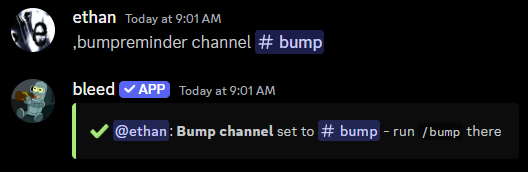
Once you've invited the **DISBOARD** bot, you can set up bump reminders by setting the channel where you want to receive reminders to run `/bump` every **two hours**.
```javascript Syntax theme={null}
,bumpreminder channel (channel)
```
```javascript Example theme={null}
,bumpreminder channel #bump
```
 ## Customizing bump reminders
### Changing the reminder message
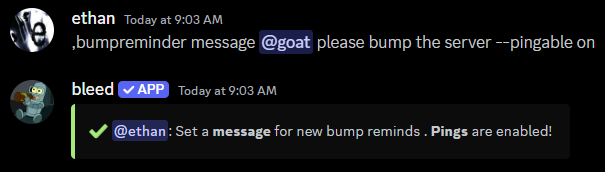
You can change the reminder message with the `bumpreminder message` command.
This is the message that will be sent every **two hours** when it's time to `/bump` the server.
The `message` parameter can be raw text or an [embed](/resources/scripting)
with dynamic [variables](/resources/scripting/variables).
This command is usually used to ping a role or user. In order for the message
to actually notify the role or user, you must include the `--pingable on` flag
in the command.
```javascript Syntax theme={null}
,bumpreminder message (text or embed code) [--pingable (on or off)]
```
```javascript Example theme={null}
,bumpreminder message @bump please bump the server --pingable on
,bumpreminder message {embed}$v{message: @bump}$v{title: bump}$v{description: please bump the server} --pingable on
```
## Customizing bump reminders
### Changing the reminder message
You can change the reminder message with the `bumpreminder message` command.
This is the message that will be sent every **two hours** when it's time to `/bump` the server.
The `message` parameter can be raw text or an [embed](/resources/scripting)
with dynamic [variables](/resources/scripting/variables).
This command is usually used to ping a role or user. In order for the message
to actually notify the role or user, you must include the `--pingable on` flag
in the command.
```javascript Syntax theme={null}
,bumpreminder message (text or embed code) [--pingable (on or off)]
```
```javascript Example theme={null}
,bumpreminder message @bump please bump the server --pingable on
,bumpreminder message {embed}$v{message: @bump}$v{title: bump}$v{description: please bump the server} --pingable on
```
 ### Changing the thank you message
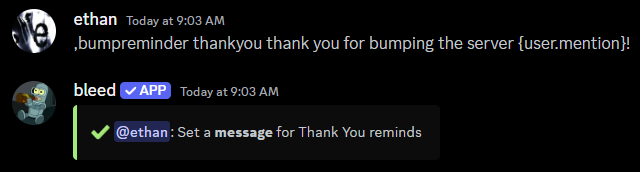
You can change the message which will be sent after bumping the server with the `bumpreminder thankyou` command.
The `message` parameter can be raw text or an [embed](/resources/scripting)
with dynamic [variables](/resources/scripting/variables).
```javascript Syntax theme={null}
,bumpreminder thankyou (text or embed code)
```
```javascript Example theme={null}
,bumpreminder thankyou thank you for bumping the server {user.mention}!
,bumpreminder thankyou {embed}$v{message: thank you for bumping the server {user.mention}}$v{description: you have helped the server grow!}
```
### Changing the thank you message
You can change the message which will be sent after bumping the server with the `bumpreminder thankyou` command.
The `message` parameter can be raw text or an [embed](/resources/scripting)
with dynamic [variables](/resources/scripting/variables).
```javascript Syntax theme={null}
,bumpreminder thankyou (text or embed code)
```
```javascript Example theme={null}
,bumpreminder thankyou thank you for bumping the server {user.mention}!
,bumpreminder thankyou {embed}$v{message: thank you for bumping the server {user.mention}}$v{description: you have helped the server grow!}
```
 ### Locking the channel
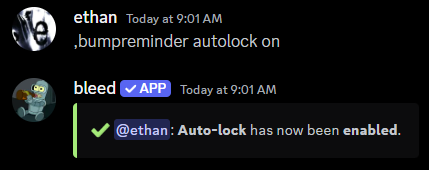
If you don't want members to send messages until it's time to bump the server, you can use the `bumpreminder autolock` command.
```javascript Syntax theme={null}
,bumpreminder autolock (on or off)
```
```javascript Example theme={null}
,bumpreminder autolock on
```
### Locking the channel
If you don't want members to send messages until it's time to bump the server, you can use the `bumpreminder autolock` command.
```javascript Syntax theme={null}
,bumpreminder autolock (on or off)
```
```javascript Example theme={null}
,bumpreminder autolock on
```
 ### Cleaning up the channel
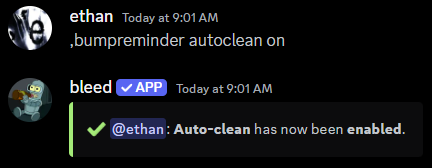
If you don't want messages which aren't `/bump` to be sent in the channel, you can use the `bumpreminder autoclean` command.
```javascript Syntax theme={null}
,bumpreminder autoclean (on or off)
```
```javascript Example theme={null}
,bumpreminder autoclean on
```
### Cleaning up the channel
If you don't want messages which aren't `/bump` to be sent in the channel, you can use the `bumpreminder autoclean` command.
```javascript Syntax theme={null}
,bumpreminder autoclean (on or off)
```
```javascript Example theme={null}
,bumpreminder autoclean on
```
 ## Viewing the configuration
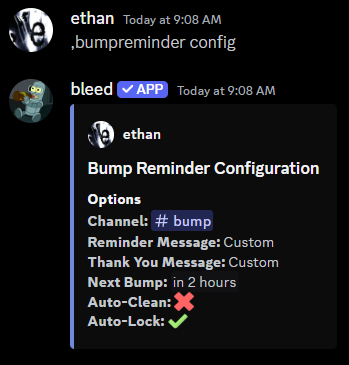
You can use the `bumpreminder config` command to view the current configuration.
## Viewing the configuration
You can use the `bumpreminder config` command to view the current configuration.