> ## Documentation Index
> Fetch the complete documentation index at: https://docs.bleed.bot/llms.txt
> Use this file to discover all available pages before exploring further.
# Logging
> Log events in your server.
## Overview
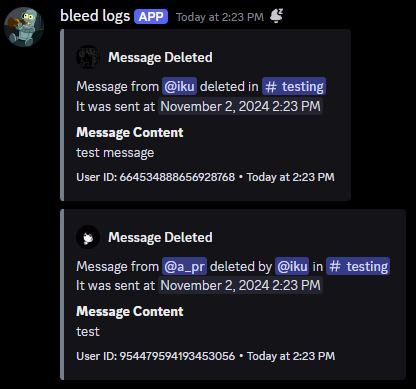
Logging allows you to log events in your server. This can be useful for keeping track of what's happening in your server.
## Adding a logging event
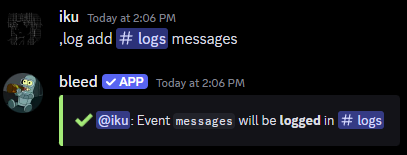
You can add a logging event using the `log add` command.
Available logging events are `messages`, `members`, `roles`, `channels`,
`invites`, `emojis` and `voice`.
Do not delete the webhook that bleed creates in your logging channels!
```javascript Syntax theme={null}
,log add (channel) (event)
```
```javascript Example theme={null}
,log add #logs messages
```
 ## Removing a logging event
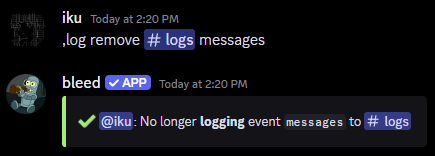
You can remove a logging event using the `log remove` command.
```javascript Syntax theme={null}
,log remove (channel) (event)
```
```javascript Example theme={null}
,log remove #logs messages
```
## Removing a logging event
You can remove a logging event using the `log remove` command.
```javascript Syntax theme={null}
,log remove (channel) (event)
```
```javascript Example theme={null}
,log remove #logs messages
```
 You can leave the event parameter empty to add or remove all logging events
from a channel.
## Ignoring a member or channel
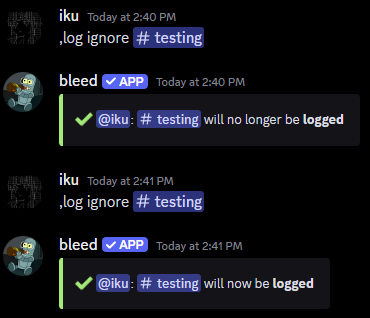
You can ignore and unignore a member or channel from being logged using the `log ignore` command.
```javascript Syntax theme={null}
,log ignore (member or channel)
```
```javascript Example theme={null}
,log ignore @jonathan
,log ignore #staff-chat
```
You can leave the event parameter empty to add or remove all logging events
from a channel.
## Ignoring a member or channel
You can ignore and unignore a member or channel from being logged using the `log ignore` command.
```javascript Syntax theme={null}
,log ignore (member or channel)
```
```javascript Example theme={null}
,log ignore @jonathan
,log ignore #staff-chat
```
 ## Related commands
You can use the `log ignore list` command to view all ignored members and
channels.
## Related commands
You can use the `log ignore list` command to view all ignored members and
channels.