> ## Documentation Index
> Fetch the complete documentation index at: https://docs.bleed.bot/llms.txt
> Use this file to discover all available pages before exploring further.
# Booster Roles
> Reward your boosters with unique roles for themselves.
## What are booster roles?
Booster roles are unique roles that are given to members which have boosted your server. These roles can be fully customized by the members themselves.
## Setting the base role
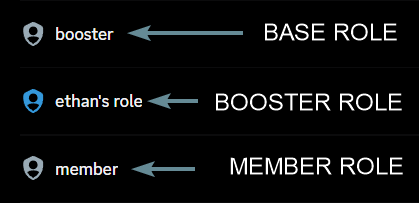
In order for the booster roles to work, you must set a base role. All booster roles will be placed under this role.
The base role should be a role which is above any roles with a color, otherwise the color won't be visible due to Discord's role hierarchy.
```javascript Syntax theme={null}
,boosterrole base (role)
```
```javascript Example theme={null}
,boosterrole base @------
```
 ## Creating a booster role
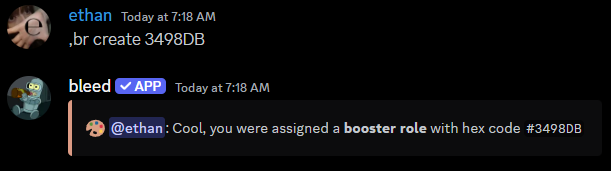
You can create a booster role by using the `boosterrole` command itself.
The `color` parameter can be a hex code or a color name.
```javascript Syntax theme={null}
,boosterrole (color)
```
```javascript Example theme={null}
,boosterrole #3498DB boss
```
## Creating a booster role
You can create a booster role by using the `boosterrole` command itself.
The `color` parameter can be a hex code or a color name.
```javascript Syntax theme={null}
,boosterrole (color)
```
```javascript Example theme={null}
,boosterrole #3498DB boss
```
 ## Customizing your booster role
### Changing the name
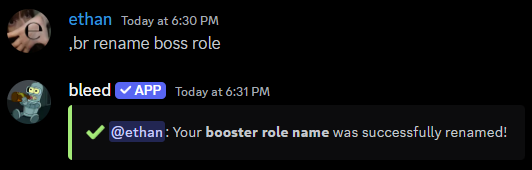
You can use the `boosterrole rename` command to change the name of your booster role.
```javascript Syntax theme={null}
,boosterrole rename (new name)
```
```javascript Example theme={null}
,boosterrole rename boss role
```
## Customizing your booster role
### Changing the name
You can use the `boosterrole rename` command to change the name of your booster role.
```javascript Syntax theme={null}
,boosterrole rename (new name)
```
```javascript Example theme={null}
,boosterrole rename boss role
```
 ### Changing the icon
You can use the `boosterrole icon` command to change the icon of your booster role.
You can use an emoji or an attachment.
```javascript Syntax theme={null}
,boosterrole icon (emoji or attachment)
```
```javascript Example theme={null}
,boosterrole icon :cool:
,boosterrole icon https://bleed.bot/bleed.png
```
### Changing the icon
You can use the `boosterrole icon` command to change the icon of your booster role.
You can use an emoji or an attachment.
```javascript Syntax theme={null}
,boosterrole icon (emoji or attachment)
```
```javascript Example theme={null}
,boosterrole icon :cool:
,boosterrole icon https://bleed.bot/bleed.png
```
 ## Removing your booster role
If you no longer want your booster role, you can use the `boosterrole remove` command.
## Automatically grant a role to boosters
You can reward your boosters with a role upon boosting your server. You can use the `boosterrole award` command to set this up.
```javascript Syntax theme={null}
,boosterrole award (role)
```
```javascript Example theme={null}
,boosterrole award @immunity
```
## Removing your booster role
If you no longer want your booster role, you can use the `boosterrole remove` command.
## Automatically grant a role to boosters
You can reward your boosters with a role upon boosting your server. You can use the `boosterrole award` command to set this up.
```javascript Syntax theme={null}
,boosterrole award (role)
```
```javascript Example theme={null}
,boosterrole award @immunity
```
 ### Viewing the role being awarded
You can use the `boosterrole award view` command to view the role being awarded.
### Viewing the role being awarded
You can use the `boosterrole award view` command to view the role being awarded.
 ### Removing the role being awarded
You can use the `boosterrole award remove` command to remove the role being awarded.
### Removing the role being awarded
You can use the `boosterrole award remove` command to remove the role being awarded.
 ## Related commands
You can use the `boosterrole list` command to view all booster roles.
You can use the `boosterrole cleanup` command if they weren't removed
properly.
## Related commands
You can use the `boosterrole list` command to view all booster roles.
You can use the `boosterrole cleanup` command if they weren't removed
properly.