> ## Documentation Index
> Fetch the complete documentation index at: https://docs.bleed.bot/llms.txt
> Use this file to discover all available pages before exploring further.
# Giveaway
> Easily create events where members can win prizes.
## Starting a Giveaway
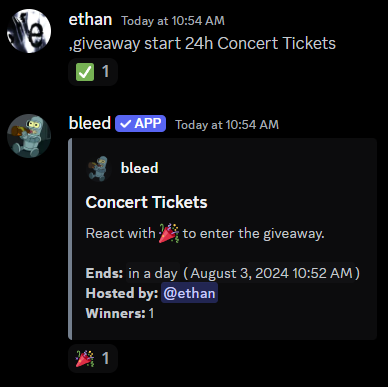
You can start a giveaway with the `giveaway start` command.
```javascript Syntax theme={null}
,giveaway start (duration) (prize)
```
```javascript Example theme={null}
,giveaway start #giveaways 24h 2 Concert Tickets
,giveaway start 24h Concert Tickets
```
 ### Changing the details
You can customize the giveaway with the following commands
Use the `giveaway edit host` command to change the giveaway host.
```javascript Syntax theme={null}
,giveaway edit host (message link) (member)
```
```javascript Example theme={null}
,giveaway edit host .../channels/... @jonathan
```
Use the `giveaway edit prize` command to change the giveaway prize.
```javascript Syntax theme={null}
,giveaway edit prize (message link) (prize)
```
```javascript Example theme={null}
,giveaway edit prize .../channels/... bleed whitelist
```
Use the `giveaway edit duration` command to change the duration of the giveaway.
```javascript Syntax theme={null}
,giveaway edit duration (message link) (duration)
```
```javascript Example theme={null}
,giveaway edit duration .../channels/... 24h
```
Use the `giveaway edit winners` command to change the amount of people that can win the giveaway.
```javascript Syntax theme={null}
,giveaway edit winners (message link) (amount)
```
```javascript Example theme={null}
,giveaway edit winners .../channels/... 3
```
### Customizing the embed
You can customize the giveaway embed with the following commands
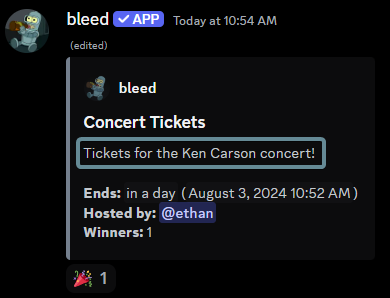
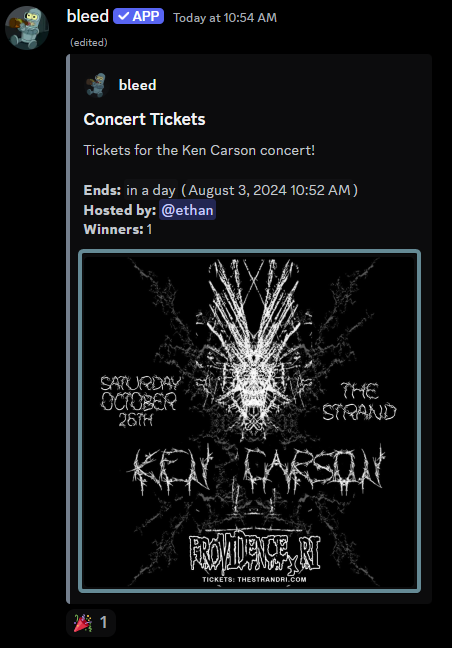
Use the `giveaway edit description` command to change the giveaway description.
```javascript Syntax theme={null}
,giveaway edit description (message link) (text)
```
```javascript Example theme={null}
,giveaway edit description .../channels/... Tickets for the Ken Carson concert!
```
### Changing the details
You can customize the giveaway with the following commands
Use the `giveaway edit host` command to change the giveaway host.
```javascript Syntax theme={null}
,giveaway edit host (message link) (member)
```
```javascript Example theme={null}
,giveaway edit host .../channels/... @jonathan
```
Use the `giveaway edit prize` command to change the giveaway prize.
```javascript Syntax theme={null}
,giveaway edit prize (message link) (prize)
```
```javascript Example theme={null}
,giveaway edit prize .../channels/... bleed whitelist
```
Use the `giveaway edit duration` command to change the duration of the giveaway.
```javascript Syntax theme={null}
,giveaway edit duration (message link) (duration)
```
```javascript Example theme={null}
,giveaway edit duration .../channels/... 24h
```
Use the `giveaway edit winners` command to change the amount of people that can win the giveaway.
```javascript Syntax theme={null}
,giveaway edit winners (message link) (amount)
```
```javascript Example theme={null}
,giveaway edit winners .../channels/... 3
```
### Customizing the embed
You can customize the giveaway embed with the following commands
Use the `giveaway edit description` command to change the giveaway description.
```javascript Syntax theme={null}
,giveaway edit description (message link) (text)
```
```javascript Example theme={null}
,giveaway edit description .../channels/... Tickets for the Ken Carson concert!
```
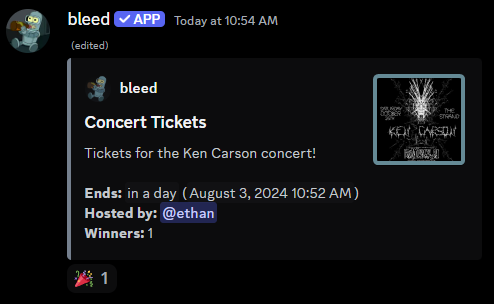
 Use the `giveaway edit thumbnail` command to change the giveaway thumbnail.
```javascript Syntax theme={null}
,giveaway edit thumbnail (message link) (thumbnail)
```
```javascript Example theme={null}
,giveaway edit thumbnail .../channels/... https://bleed.bot/bleed.png
```
Use the `giveaway edit thumbnail` command to change the giveaway thumbnail.
```javascript Syntax theme={null}
,giveaway edit thumbnail (message link) (thumbnail)
```
```javascript Example theme={null}
,giveaway edit thumbnail .../channels/... https://bleed.bot/bleed.png
```
 Use the `giveaway edit image` command to change the giveaway image.
```javascript Syntax theme={null}
,giveaway edit image (message link) (image)
```
```javascript Example theme={null}
,giveaway edit image .../channels/... https://bleed.bot/bleed.png
```
Use the `giveaway edit image` command to change the giveaway image.
```javascript Syntax theme={null}
,giveaway edit image (message link) (image)
```
```javascript Example theme={null}
,giveaway edit image .../channels/... https://bleed.bot/bleed.png
```
 ### Setting requirements
You can set requirements for the giveaway with the following commands
You can set a required role to enter the giveaway with the following command.
If you no longer want to require roles, you can re-run the command without a role.
You can use multiple roles by separating them with a comma (`,`).
```javascript Syntax theme={null}
,giveaway edit requiredroles (message link) (roles)
```
```javascript Example theme={null}
,giveaway edit requiredroles .../channels/... @Staff, @Booster
```
You can set a required level for the giveaway with the following commands.
This relies on bleed's [leveling system](/configuration/level-rewards), not other bots.
```javascript Syntax theme={null}
,giveaway edit minlevel (message link) (level)
,giveaway edit maxlevel (message link) (level)
```
```javascript Example theme={null}
,giveaway edit minlevel .../channels/... 10
,giveaway edit maxlevel .../channels/... 50
```
## Ending a Giveaway
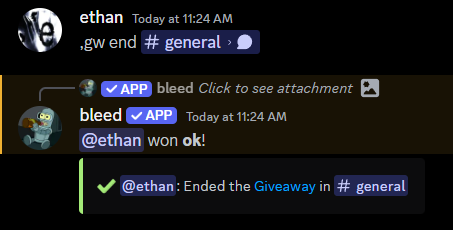
You can end a giveaway early with the `giveaway end` command.
```javascript Syntax theme={null}
,giveaway end (message link)
```
```javascript Example theme={null}
,giveaway end .../channels/...
```
### Setting requirements
You can set requirements for the giveaway with the following commands
You can set a required role to enter the giveaway with the following command.
If you no longer want to require roles, you can re-run the command without a role.
You can use multiple roles by separating them with a comma (`,`).
```javascript Syntax theme={null}
,giveaway edit requiredroles (message link) (roles)
```
```javascript Example theme={null}
,giveaway edit requiredroles .../channels/... @Staff, @Booster
```
You can set a required level for the giveaway with the following commands.
This relies on bleed's [leveling system](/configuration/level-rewards), not other bots.
```javascript Syntax theme={null}
,giveaway edit minlevel (message link) (level)
,giveaway edit maxlevel (message link) (level)
```
```javascript Example theme={null}
,giveaway edit minlevel .../channels/... 10
,giveaway edit maxlevel .../channels/... 50
```
## Ending a Giveaway
You can end a giveaway early with the `giveaway end` command.
```javascript Syntax theme={null}
,giveaway end (message link)
```
```javascript Example theme={null}
,giveaway end .../channels/...
```
 ## Rerolling a Giveaway
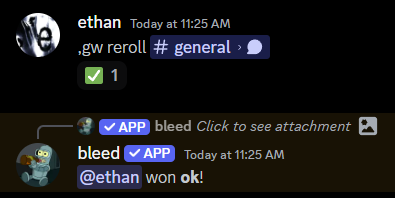
You can reroll the winners of a giveaway with the `giveaway reroll` command.
```javascript Syntax theme={null}
,giveaway reroll (message link)
```
```javascript Example theme={null}
,giveaway reroll .../channels/...
```
## Rerolling a Giveaway
You can reroll the winners of a giveaway with the `giveaway reroll` command.
```javascript Syntax theme={null}
,giveaway reroll (message link)
```
```javascript Example theme={null}
,giveaway reroll .../channels/...
```
 ## Canceling a Giveaway
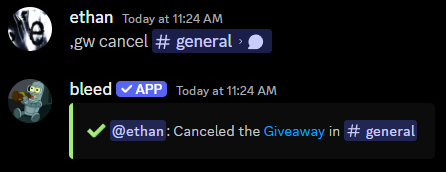
You can cancel a giveaway with the `giveaway cancel` command.
This will not draw any winners and will delete the giveaway message.
```javascript Syntax theme={null}
,giveaway cancel (message link)
```
```javascript Example theme={null}
,giveaway cancel .../channels/...
```
## Canceling a Giveaway
You can cancel a giveaway with the `giveaway cancel` command.
This will not draw any winners and will delete the giveaway message.
```javascript Syntax theme={null}
,giveaway cancel (message link)
```
```javascript Example theme={null}
,giveaway cancel .../channels/...
```
 ## Viewing all Giveaways
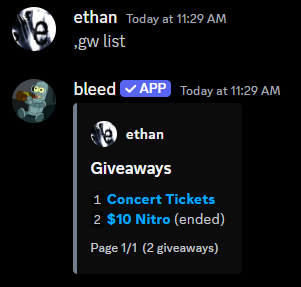
You can view all giveaways with the `giveaway list` command.
This will display past and active giveaways.
## Viewing all Giveaways
You can view all giveaways with the `giveaway list` command.
This will display past and active giveaways.