
Overview
Filters punish messages that break your rules. Triggering a filter can also add points to the member, and enough points trigger the punishments in your escalation ladder. Filter types:caps, links, emoji, spoilers, musicfiles, massmention,
invites, and spam. Words are handled separately with /filter word.
Setting up a filter
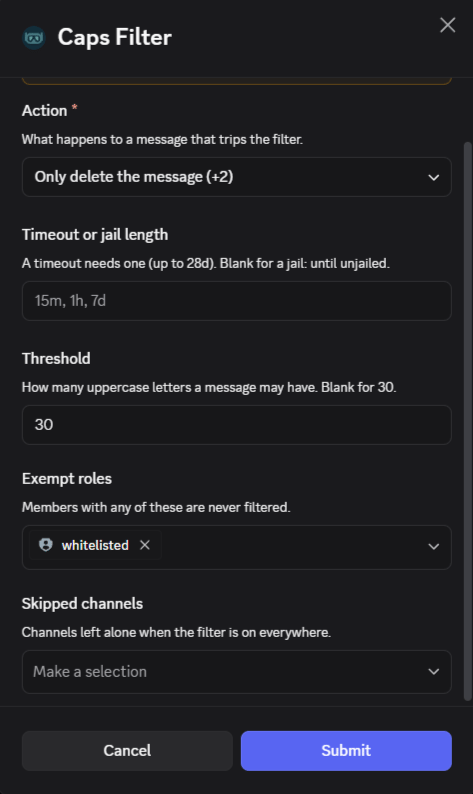
Use/filter setup to configure a filter with a form.
Caps is used here as an example, other filters will also open a form. Other filters use the same form, except:
invitesandmusicfileshave no threshold.spamadds a Window (seconds) field and only allowsdeleteandwarn.linksadds an Allowed sites field.
/filter set to turn a filter on or off. Leave channel empty to apply it
everywhere.
duration accepts values like 15m, 1h, or 7d; see the
duration format. A jail with no
duration lasts until the member is unjailed./filter clear to remove a filter’s channel settings and /filter config
to view them. Leave type or channel empty to include everything.
Filter defaults
Exempt roles
Members with an exempt role are ignored by that filter. Requires Manage Channels.type also accepts word.
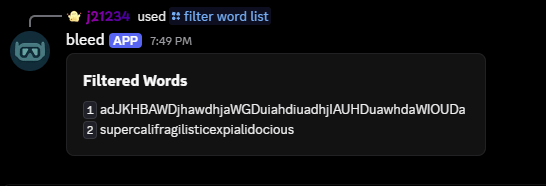
Word filter
Links whitelist
Allow specific sites through the links filter. Requires Manage Channels.Snipe
Hide filtered content from snipe. Requires Manage Channels.Filter points
Set how many points each trigger adds and which punishments members receive as points build up. Points can expire after1h to 365d, or never.
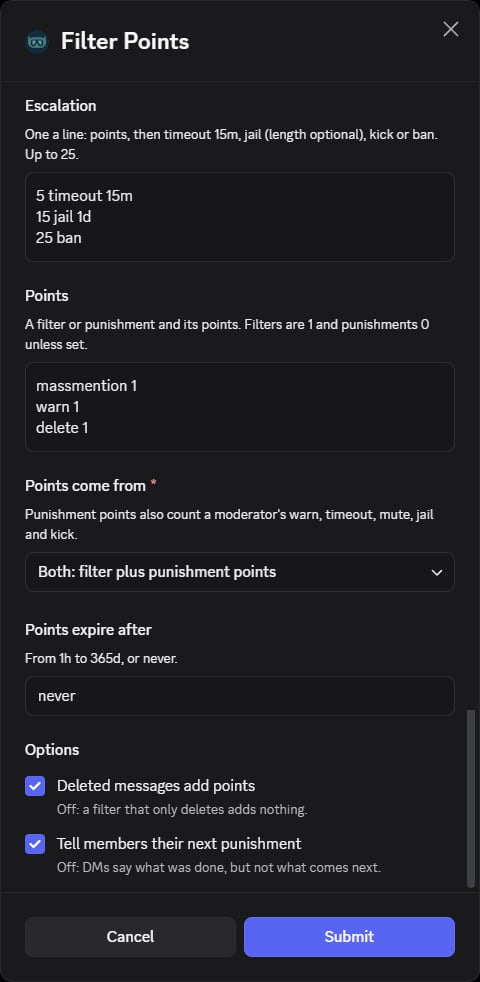
/filter points setup opens with these defaults:
The sample text in the empty boxes is only a placeholder and isn’t saved.
Escalation example:
5 timeout 15m, 10 jail 1d, 15 kick, 25 ban.
Points example: caps 1, massmention 3, warn 1, mute 2, jail 4.Leave
amount empty in /filter points clear to remove all of a member’s
points.